ADVERTISEMENT


The ID.me Authenticator app is designed for individuals who prioritize security in their online interactions. With the rise of cyber threats, it's crucial for users to protect their personal information, and this app caters specifically to those who are looking for a reliable, free, and simple solution for Two Factor Authentication (2FA). The primary target audience includes online consumers, especially those using ID.me accounts, who wish to enhance their digital security without sacrificing convenience. By downloading the ID.me Authenticator app, users can ensure that their accounts are fortified against unauthorized access, making it an essential tool for safeguarding their digital identities. 🔒
1. TOTP Code Generation: The ID.me Authenticator app generates a 6-digit Time-Based One-Time Password (TOTP) for users. This feature allows users to securely log into their accounts by entering their username, password, and the verification code generated by the app. This ensures that only the rightful owner of the account can complete the login process. Download the ID.me Authenticator app to keep your accounts secure and accessible offline. 📱
2. Push Notification Authentication: For those looking for ease of use, the app also supports PUSH notification authentication. Users enter their username and password, and simply approve the push notification sent to their phone. This one-touch authentication makes logging in effortless while maintaining robust security protocols. By utilizing this feature, you can ensure your online activities remain safe and streamlined. 🛡️
3. Offline Functionality: One of the remarkable features of the ID.me Authenticator app is its ability to function without a network or cellular connection when generating TOTP codes. Users can rest assured that they can access their codes anywhere they go, which eliminates the fear of being unable to log in due to connectivity issues. This makes the app highly reliable for users on the move. 🚀
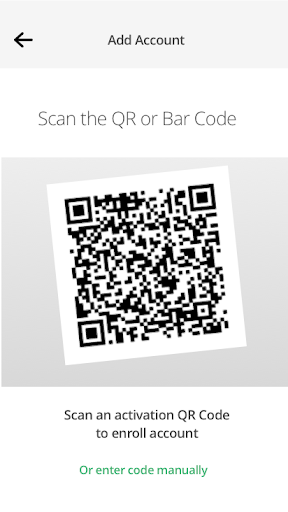
4. Easy Setup: Setting up the app is a breeze. Users can enroll and connect the ID.me Authenticator to their accounts by simply scanning a QR code during the setup process. This straightforward procedure makes it accessible for users of all technical backgrounds and encourages more people to enhance their online security. 🔧
1. User Interface: While the app serves its purpose effectively, the user interface could benefit from some modern design tweaks to enhance user experience. A more intuitive layout would help users navigate the app more efficiently.
2. Multi-Device Support: Currently, the ID.me Authenticator app is primarily designed for individual device use. Expanding its functionality to support multi-device synchronization could appeal to users who frequently switch between devices, like Android and iOS. This feature could make the app even more versatile. 🔄
3. Enhanced Backup Options: Providing users with more convenient backup options for their generated codes could improve usability and security. Current mechanisms are somewhat limited, and additional backup functionalities would alleviate users' concerns regarding loss of access due to device failure. 💾
The ID.me Authenticator app has garnered a variety of user feedback. Positive reviews often emphasize the app's security and simplicity. Many users appreciate the ease with which they can install the ID.me Authenticator app and connect it to their accounts, especially highlighting the hassle-free setup process. 🤗
However, some negative feedback points out the app's user interface, with several users noting that the design feels dated and could be more user-friendly. Others have expressed a desire for features that allow better integration across devices. Overall, while the ID.me Authenticator app is praised for its functionalities, there's clear room for improvement in its design and capabilities. 🌟